
As of today, Just Write stops leaving you alone at the blank page. Writer's Unblock is live in the story editor — a brainstorming companion that reads your outline, your characters, and your timeline, then hands you a few ideas for what could happen next. It doesn't write the page for you. It just stops you from staring at a cursor wondering what comes after "then."
What this was like before today
Every tool in Just Write has always been good at turning an outline into prose. Tell it what happens in a scene and it'll draft the scene. But that only works if you know what happens. The moment you don't — the moment you finish chapter three and genuinely have no idea what chapter four is — there was nothing built for that. You'd close the editor, open a notes app, and either free-write your way out of the fog or go searching for generic plot-twist advice that had nothing to do with your actual characters. "Add conflict" doesn't help when you can't remember which of your six characters still has an unresolved grudge.
That gap was the single most common kind of stall we heard about. Not "I don't know how to write a scene" — people know how to write scenes. It's "I don't know which scene to write." Until today, Just Write had no answer for that question.
What changes today
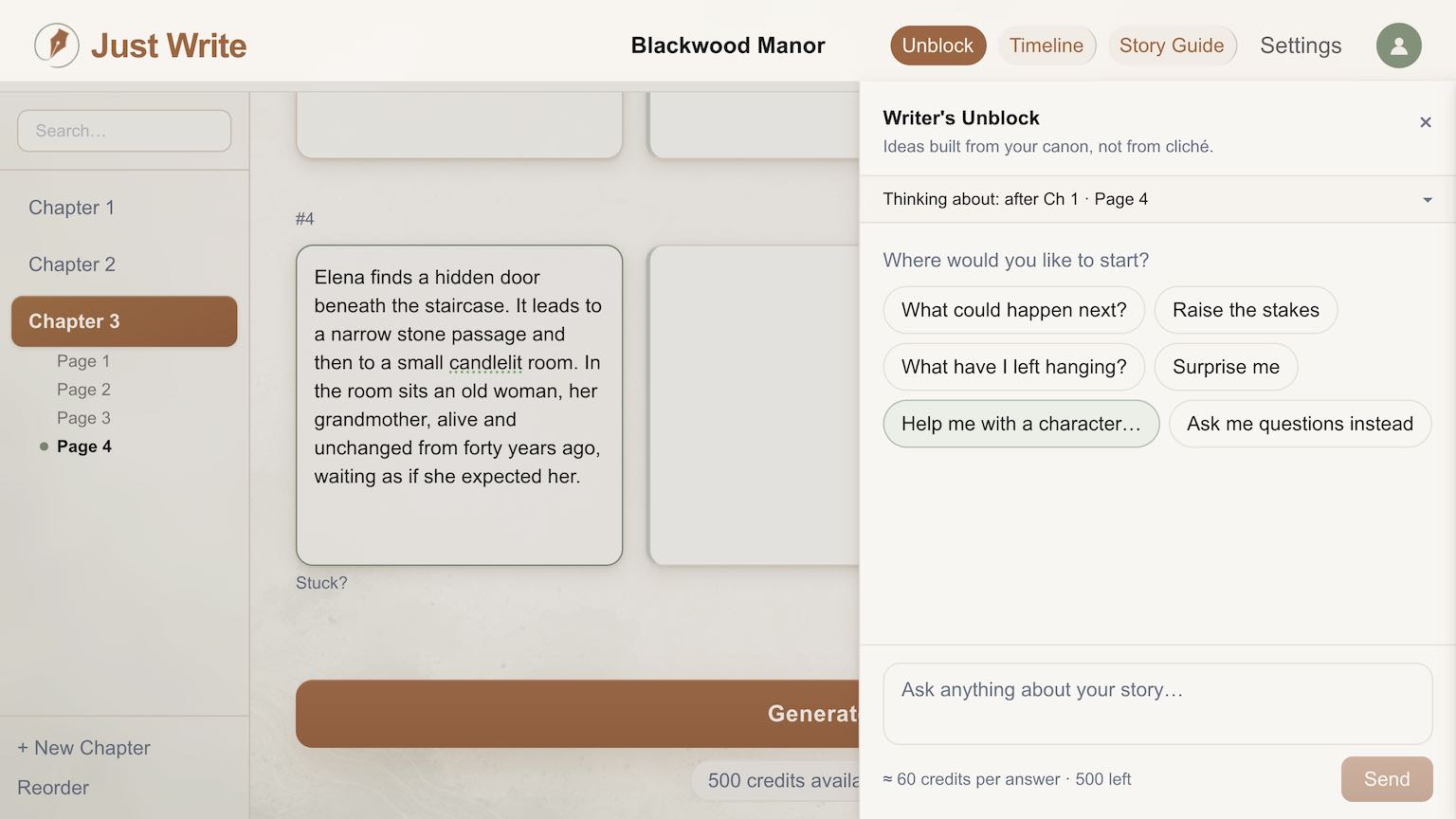
Writer's Unblock lives right in the editor, one click away. Open it and you're not facing a blank prompt box — you're facing your own story. It has already read your page outlines, the summary of everything you've written so far, your Story Guide's characters and places, and your Timeline, including events you've planned but not written yet. Ask it what could happen next, or pick a starter: raise the stakes, surprise me, what have I left hanging, help me with a character. It comes back with two or three idea cards — a title, a short pitch, and a line explaining exactly why it fits: the torn page from chapter one, the character who's gone quiet, the storm your timeline says is three chapters out.
You read the cards, you pick a direction, you write the page. There's no button that inserts an idea into your draft, and if you ask it to just write the scene for you, it'll decline and offer you more ideas instead. That's by design. The tool that drafts prose already exists elsewhere in Just Write; this one exists for the step before that, the one nothing in the app used to touch.
A few things worth knowing before you try it:
- You need at least two written pages before Unblock has enough to work with — before that, it tells you how many pages to go.
- Click Stuck? under any page to start the conversation from that exact spot, or change the "Thinking about" line to brainstorm a different point in your story.
- Every answer costs a small number of credits, far less than generating a page, and the drawer shows the cost and your balance before you ask.
- Nothing happens automatically. Opening the drawer or switching pages never triggers a generation — you ask, it answers, nothing more.
- Past conversations are saved under History, so an idea you liked last week doesn't vanish.
If you'd rather work it out in your own head first, there's a starter for that too — "ask me questions instead" — which prompts you instead of pitching you anything. Useful if the problem isn't a lack of ideas so much as too many half-formed ones.
This pairs naturally with a story that already has some shape to lean on. If your cast of characters or your timeline is thin, Unblock has less to work with — the ideas it gives are only as sharp as the story it's reading. And if the actual stall is structural rather than a single stuck page, it's worth a look at outlining fast first.
Try it on your own stall
Open any story with a couple of written pages, click Unblock in the editor header, and ask it what could happen next. If you want help turning whatever it gives you into an actual page, that's what Just Write is for — but the ideas are yours to make first. There's also a one-step tutorial at /stories/tutorial/writers-unblock if you want to see it work before you point it at something that matters.