

As of today, Just Write knows what day it is in your story. Timeline is live on every story's edit page, and it closes a gap that's been there since day one: until now, Just Write had no memory of your story's chronology at all. It knew your outline. It knew your scenes. It had no idea that the doctor's appointment was Saturday, that school started two weeks ago, or that the exam was two days out and closing fast. That all lived in your head, the way it always has.
What the workaround used to look like
If you've outlined a story with any kind of clock in it — a mystery counting down to a deadline, a school-year drama, a multi-generation epic — you know the drill. You built a separate document. Maybe a spreadsheet with dates in one column and scene numbers in another. Maybe just a running list at the top of your notes: "Ch 3 — Tuesday. Ch 7 — two weeks later. Ch 12 — flashback, six years earlier." Every time you added a scene, you updated it by hand. Every time you moved a scene, you had to remember to go fix the list too, and half the time you didn't, and three chapters later a character mentioned an event that hadn't technically happened yet.
The AI drafting had the same blind spot. It could write a great scene, but it had no way of knowing that "yesterday" in the outline meant something specific, or that the exam mentioned in chapter two was now only two days away in chapter nine. You'd catch the drift in revision, if you caught it at all.
What changes today
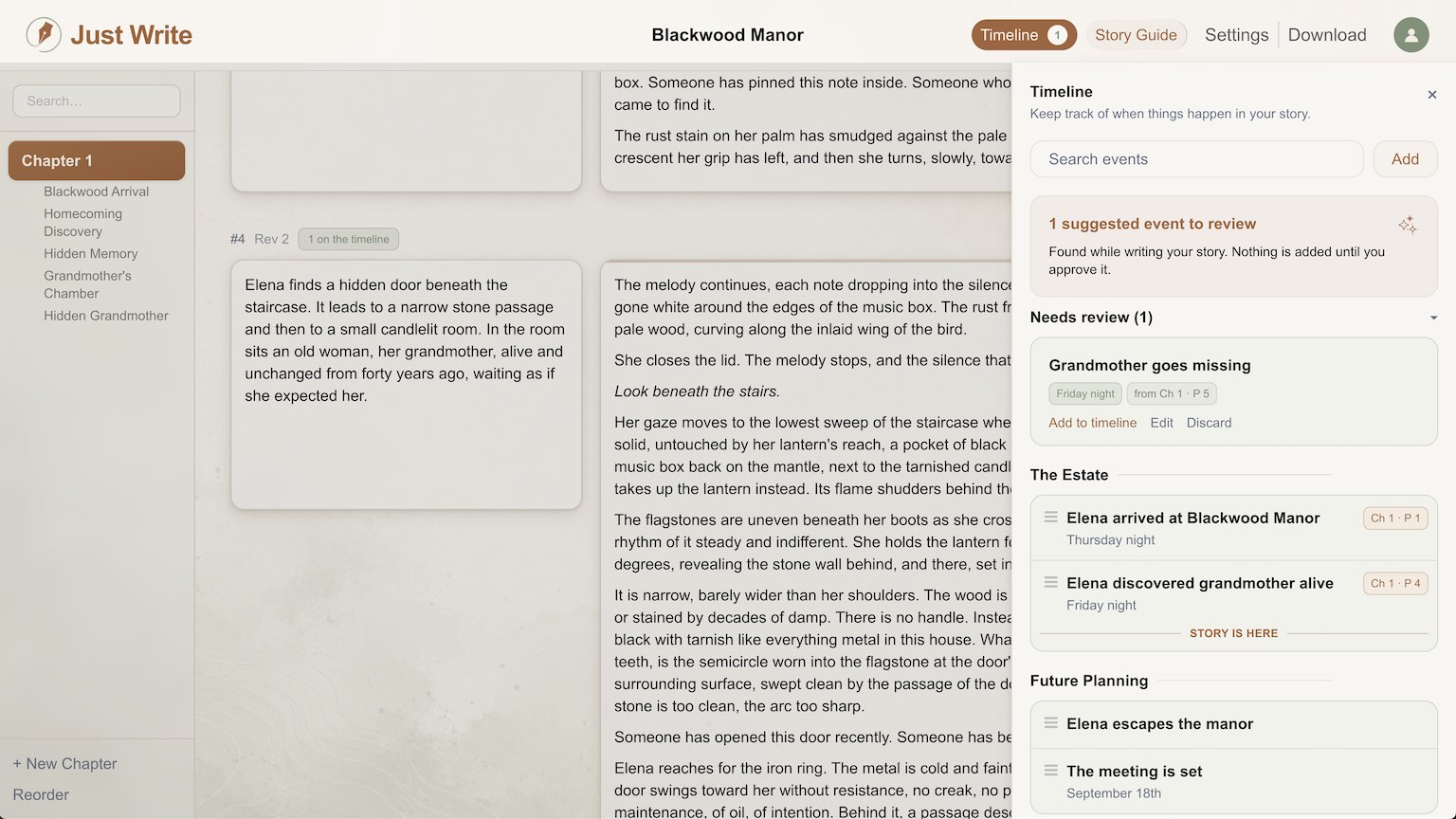
Timeline is a panel that slides out next to your outline and the Story Guide on the story edit page. You add an event as a single line — "Bob visited the doctor" — and drag it into place among your other events. If your story needs a time label, you add one in whatever language the story actually uses: "Saturday morning" for a tight domestic drama, "Year 1042, Age of Fire" for something that spans centuries. Nothing is forced onto a calendar. The order you set is the truth; labels and exact dates are optional layers on top of it.
You can group events under named periods — "Junior Year," "The Third Age" — and drop a "story is here" marker so you always know exactly where the narrative currently stands relative to everything that's happened and everything that's coming. Each event can link to the specific scene where it occurs, so pages in the editor now show a small chip whenever an event lands there, and clicking an event jumps you straight to it. Tell something out of order on purpose — a flashback, a delayed reveal — and Timeline badges it, so your structure is something you can see instead of something you're just hoping you remembered correctly.
The part that actually solves the old problem: the AI keeps this timeline with you as you write. When Just Write turns outline into prose, it watches for new events and proposes them for your review. You approve, edit, or toss each one — your own entries are never touched or overwritten. And it works in the other direction too. Because the AI now sees where the story stands and what's coming next, generated prose gets the weekday right, remembers what happened yesterday, and can actually build tension toward a deadline instead of vaguely gesturing at urgency.
Who this is for
If you outline at all, Timeline is worth opening today, but four kinds of writers were the reason it got built:
- Day-by-day contemporary or domestic stories, where "Tuesday" and "the next morning" carry real weight.
- Mysteries and thrillers with a ticking clock, where the reader needs to feel exactly how much time is left.
- Epics and secondary-world fantasy, where events span years or ages and need their own calendar entirely.
- Serials written at speed, where continuity errors compound fast because there's no time to reread the whole draft before the next installment.
If you're still at the shape-of-the-story stage rather than the when-does-it-happen stage, our piece on outlining a novel fast pairs well with this — build the skeleton first, then let Timeline hold the dates. And if your structure question is really about pacing and reveal order rather than dates, three-act structure without the jargon covers the piece Timeline doesn't.
Try it now
Open any story's edit page and look for the Timeline drawer next to the Story Guide. Add three or four key events from your current draft, drag them into order, and drop a time label on the ones that need it. Then keep writing for a scene or two and watch the AI start proposing events on its own — that's the part that used to be entirely on you.
If you're mid-draft and want a hand turning that timeline into actual prose that respects it, that's exactly what Just Write is for.